 Skip to content
To move a custom canopy tent printing project from artwork file to approved proof, first lock the tent model, size, and printed panels. Then obtain the correct supplier template, submit editable artwork with usable logos and images, and ask for a preflight check. Review the resulting 2D or 3D proof panel by panel, consolidate revisions, and approve one clearly identified version in writing. The key distinction is simple: a digital proof approves content, placement, orientation, and assigned color references. It does not automatically guarantee the appearance of ink on fabric, hardware coverage, or an exact screen-to-print color match unless a physical sample and acceptance method are separately agreed.
What Does the Artwork-to-Proof Workflow Look Like?
| Stage | Buyer action | Approval output |
|---|---|---|
| 1. Define the product | Confirm tent model, size, printed components, quantity, and viewing sides | Approved print map |
| 2. Get the template | Request the template for that exact product configuration | Correct panel layout and dimensions |
| 3. Prepare artwork | Supply editable source files, logos, images, fonts, and color references | Complete artwork package |
| 4. Preflight the file | Resolve missing fonts, links, resolution, safe-area, and orientation issues | Production-usable artwork |
| 5. Review the proof | Check every panel in 2D and, when useful, the assembled view in 3D | Marked-up proof or revision approval |
| 6. Control revisions | Return one consolidated comment list and verify the new revision number | Final corrected proof |
| 7. Consider a sample | Request a material swatch or printed sample when physical appearance is critical | Physical reference, if ordered |
| 8. Approve in writing | Name the exact proof version and approved scope | Locked production instruction |
The customer’s design file is not yet a production instruction. The approved proof is the controlled bridge between creative artwork and the tent that will be cut, sewn, and assembled.
What Must Be Confirmed Before Designing the Tent?
Start with the physical product, not the logo. Products with the same nominal footprint may still have different roof panels, valance depths, seams, visible areas, or attachment points.
Confirm these items before placing artwork:
- Exact canopy model and size
- Roof, valance, sidewall, half-wall, and accessory requirements
- Which sides will be printed and which direction each side faces
- Full-coverage graphics versus selected logos or messages
- Quantity and whether every unit uses the same artwork
MorningTents presents a design flow that moves from a canopy template to a personalized template and final canopy. Its About page also says that buyers designing artwork themselves can receive templates and tips. Request the current template for the exact quoted configuration rather than reusing an unverified file from an older order.
Buyer answer: Product configuration is an artwork input. If the tent, panel set, or print coverage changes, the artwork may need a new template and a new proof.
Which Artwork Files Should You Send?
The source package should be editable and complete. For logos and line graphics, vector artwork is usually safest because it scales without losing edge quality. Adobe describes vector graphics as resolution-independent in its graphics format guidance.
A practical submission package may include:
- The original editable layout file, when available
- Vector logo files rather than logos copied from a website or presentation
- Original linked photographs or bitmap images
- Fonts, or an outlined copy of final text plus an editable reference copy
- Brand color references and a PDF preview showing intended appearance
Do not rely on filename extensions alone: a logo inside a PDF is not necessarily vector. Adobe’s bitmap image guidance explains that raster quality depends on resolution and intended output. Large-format textile requirements vary, so ask MorningTents to confirm accepted formats and required effective resolution at actual print size.
Avoid converting every text object to outlines before saving the only master file. Outlined text prevents font substitution, but it also makes later spelling changes harder. Retain an editable original and send an outlined production copy if requested.
How Should Artwork Be Designed for an Assembled Canopy?
A canopy is not a flat poster. Graphics cross sloped roof panels, valances, seams, corners, and removable walls.
Use the template to answer five spatial questions:
- Where is the primary viewing zone? Place the brand and core message toward the expected approach direction.
- What may be interrupted? Keep critical details away from seams, folds, fasteners, and restricted areas.
- How do adjacent panels meet? Decide whether graphics continue around corners or stop at panel edges.
- Which way is each wall viewed? Mark inside/outside orientation and left/right position.
- What survives at distance? Prioritize readable hierarchy over small supporting copy.

Do not invent a bleed, safe area, seam allowance, or hardware exclusion zone. Use only the dimensions and guides on the supplier’s current template, then ask what each line means if the legend is unclear.
What Is the Difference Between a 2D Proof and a 3D Proof?
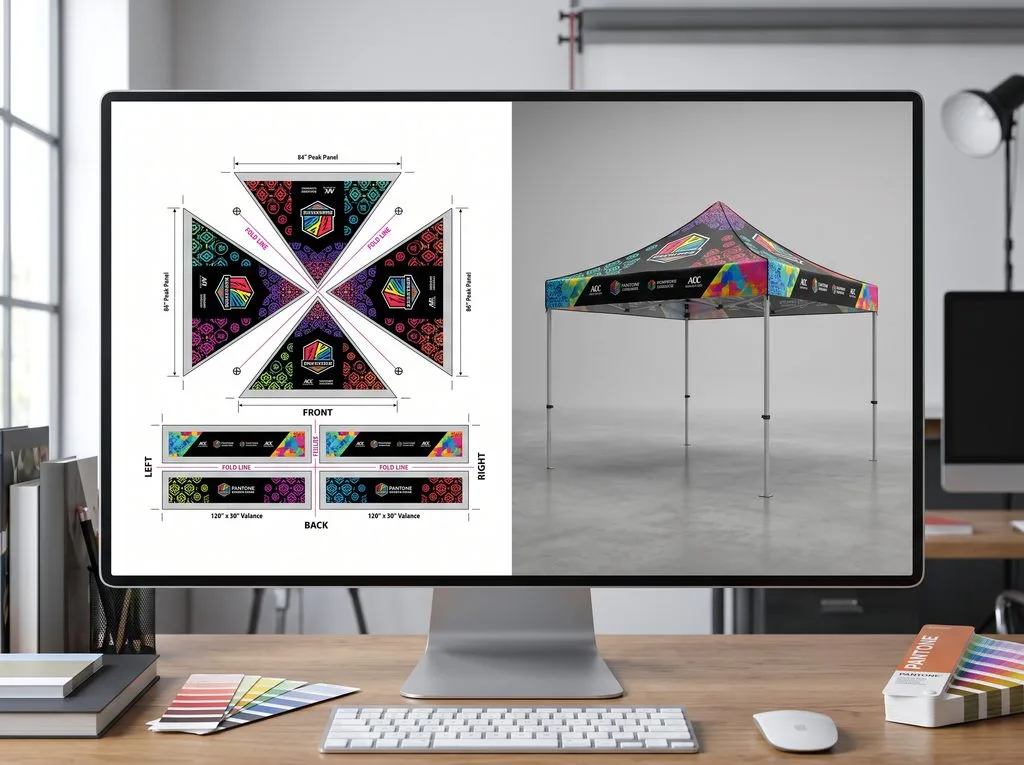
MorningTents states that its in-house graphic design team can prepare 2D and 3D proofs. The two views answer different questions and work best together.
| Proof type | Best for checking | Limitation |
|---|---|---|
| 2D panel proof | Text, dimensions, logo scale, panel assignment, color callouts, and detailed alignment | May not make the assembled relationship between faces obvious |
| 3D assembled proof | Overall balance, orientation, visibility, corner relationships, and the customer-facing appearance | Perspective can hide fine detail and should not replace panel-level review |
Compare the 2D proof with the approved copy, then use the 3D view to check how roof, valance, and wall graphics relate. If the views disagree, request clarification rather than assuming which controls production.
Does a Digital Proof Guarantee Printed Color?
No. A digital proof can confirm assigned color values or references, but a screen is not printed fabric. Adobe says soft proofing depends on monitor calibration, device profiles, and viewing conditions in its soft-proofing guide. A monitor emits light while print reflects it, so exact screen-to-print matching is not a realistic default in Adobe’s print preparation guidance.
For color-sensitive work, ask the supplier to define the approval method:
- Are colors approved as named spot references, process values, or another specification?
- Does the proof show assigned values or only a visual simulation?
- Is a fabric swatch, strike-off, or printed sample available?
- What variation standard, if any, applies to production?
MorningTents describes full-color dye-sublimation printing on its canopy tent page, but project-specific color targets, tolerances, and sampling options should be confirmed in the quotation or approval record. Do not write “match my screen” as the only color instruction.
How Should Revisions Be Controlled?
Comments spread across email, chat, screenshots, and calls can conflict. Nominate one approver and send one consolidated change list per round.
A useful proof name is specific, for example:
Brand_EventTent_10x10_Proof_R03_2026-09-09.pdf
For each change, identify the revision, panel, element, and required state. Replace “make the logo bigger” with a marked dimension and position. Recheck the complete revised proof; one corrected panel does not prove the others stayed unchanged.
Never approve files named only “final,” “new final,” or “final final.” The approval message should repeat the unique filename or revision code.
When Is a Physical Sample Worth Requesting?
A physical reference is useful for critical brand colors, subtle gradients, fine details, unfamiliar fabric, a new print method, or a high-consequence order.
A swatch shows material and approximate color behavior; a strike-off checks a selected graphic area; a finished pre-production unit can reveal seams and scale. Ask what is available, whether it becomes the production reference, and how it affects cost and schedule.

What Should You Check Before Approving the Proof?
Use this final approval checklist:
- The proof shows the correct customer, project, tent model, size, and quantity.
- Every printed roof, valance, wall, and accessory is present.
- Brand names, URLs, phone numbers, dates, and legal marks are correct.
- Logos are the current versions and are not stretched, cropped, or reversed.
- Panel labels, viewing directions, and inside/outside orientations are clear.
- Important content stays within supplier-designated printable and safe areas.
- Color references match the written approval method.
- The 2D panels and 3D assembled view agree.
- The proof revision and filename are unique.
- Any required sample has been reviewed and its status recorded.
- One authorized person has approved the exact version in writing.
An effective approval message can be short: “Approved for production: Brand_EventTent_10x10_Proof_R03_2026-09-09.pdf. Approval covers artwork content, placement, orientation, and the listed color references. Physical color is governed only by the separately approved sample/reference, if applicable.” Adapt the final sentence to the supplier’s documented terms.
What Common Artwork Approval Mistakes Cause Rework?
The most frequent problems are procedural rather than artistic:
- Designing before the product and print coverage are fixed
- Sending only a compressed screenshot or website logo
- Reusing an old template without checking the current model
- Omitting fonts or linked images
- Treating a 3D rendering as the only detailed proof
- Approving color by screen appearance alone
- Returning contradictory comments from several stakeholders
- Checking only the revised panel instead of the complete new proof
- Approving an ambiguous filename without a revision number
- Changing artwork after approval without issuing a replacement proof
Each mistake breaks the chain between buyer intent and production instruction. A controlled workflow records what was supplied, changed, and approved.
Frequently Asked Questions
What file format is best for custom canopy tent printing?
Editable vector artwork is generally best for logos and line graphics. Photographs need adequate effective resolution at output size. Confirm MorningTents’ current formats and requirements for the exact design.
Can MorningTents help if my artwork is not production-ready?
MorningTents says its team can prepare 2D and 3D proofs and provide templates and tips. Ask what design assistance is included in the quotation.
Is an approved PDF proof the same as an approved physical sample?
No. A PDF proof normally controls artwork content and layout. A physical swatch, strike-off, or pre-production sample evaluates selected material and print characteristics. The order documents should state which reference governs production.
Can artwork from a previous tent order be reused?
Possibly, if the model, size, panel set, template revision, print method, and branding are unchanged. Still request a newly identified proof for the current order.
Who should approve the final proof?
One authorized person who can verify brand accuracy, event information, product configuration, and commercial scope. Internal stakeholders can review, but their comments should be consolidated before they reach the supplier.
Turn the Proof into a Reliable Production Instruction
Good custom canopy tent printing depends less on sending “a logo” and more on controlling the decisions around it. Lock the product first, design on the correct template, submit complete source files, verify both panel details and assembled orientation, separate digital layout approval from physical color approval, and name the exact revision authorized for production.
To start a project, send MorningTents the tent model or intended use, size, quantity, printed components, artwork status, destination, and required date through the custom canopy tent contact page. Ask the team to confirm current artwork specifications, proof stages, color approval method, sample options, revision terms, and the event that formally releases the order to production.
